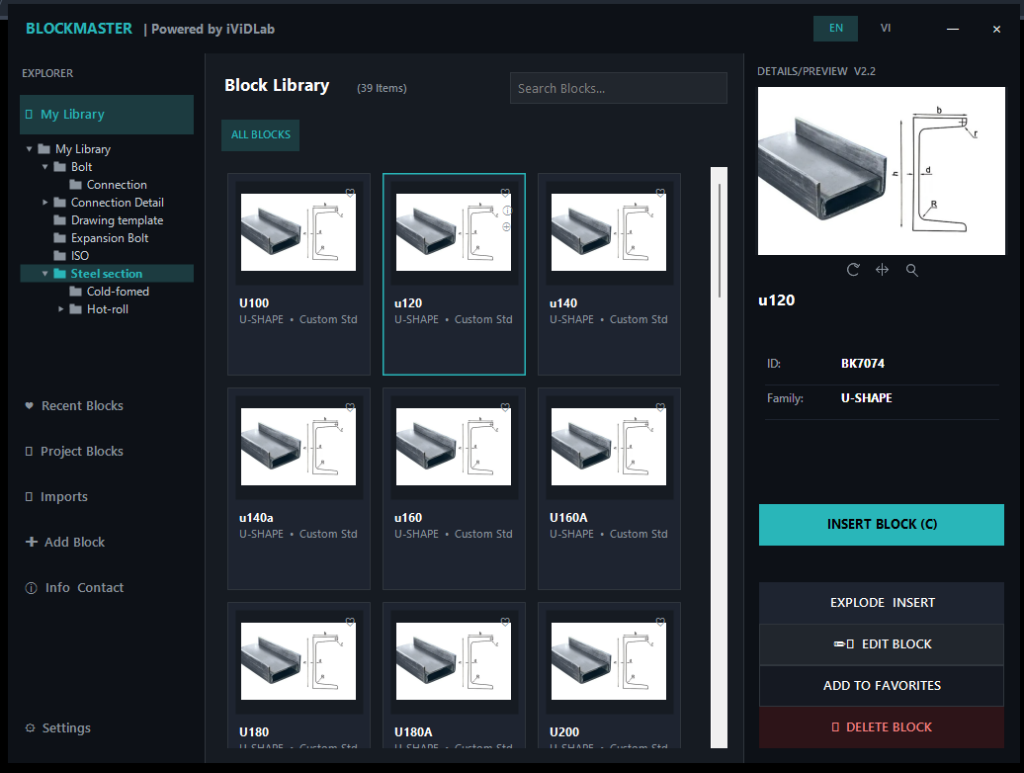
Trong quá trình thiết kế AutoCAD, việc chỉnh sửa các tệp tin Block nguồn (các tệp .dwg lưu trữ) thường yêu cầu các thao tác thủ công rườm rà. With phiên bản BLOCKMASTER mới nhất, nhóm phát triển iViDLab đã tích hợp nút ✏️ EDIT BLOCK đột phá, cho phép mở tệp nguồn để chỉnh sửa ngay lập tức trực tiếp từ giao diện phần mềm.
Thách thức kỹ thuật: Lỗi "Invalid execution context"
Khi tích hợp WinForms trong AutoCAD .NET, luồng giao diện người dùng (UI thread) của Form Modal mặc định hoạt động trong Document Context. Khi người dùng click nút chỉnh sửa và cố gắng gọi phương thức mở tệp vẽ mới (DocumentCollection.Open), AutoCAD lập tức chặn lại và ném ra ngoại lệ Invalid execution context.
Giải pháp kiến trúc: Session Command Pattern
Để giải quyết triệt để lỗi này, iViDLab đã thiết kế mô hình **Session Command Pattern**. Thay vì thực thi trực tiếp trên luồng của WinForms, phần mềm chia tách quy trình làm 2 bước:
1. Đăng ký lệnh độc lập Session
Chúng tôi đăng ký một lệnh nội bộ với cờ CommandFlags.Session, cho phép lệnh này chạy ngoài tài liệu vẽ hiện tại:
public void OpenFileCommand() { ... }
2. Gửi lệnh bất đồng bộ từ Nút Phẳng
Khi nhấn nút ✏️ EDIT BLOCK, hệ thống lưu tệp tin cần mở vào biến tĩnh toàn cục, đóng modal Form để nhường lại luồng điều khiển, sau đó gửi lệnh thực thi bất đồng bộ lên bộ điều khiển AutoCAD:
Trải nghiệm Kỹ sư chuyên nghiệp
Quy trình hoạt động diễn ra mượt mà trong nháy mắt. Chỉ với 1 cú click chuột, Form thư viện sẽ đóng lại, AutoCAD tự động chuyển tiêu điểm sang bản vẽ nguồn vừa mở (hoặc kích hoạt ngay tab bản vẽ nếu đã được mở trước đó). Người dùng có thể tiến hành chỉnh sửa và lưu lại ngay lập tức.
Kết luận
Bằng việc vượt qua các giới hạn kỹ thuật của AutoCAD API thông qua giải pháp kiến trúc Session Command thông minh, BLOCKMASTER đã chứng minh năng lực thiết kế phần mềm chuẩn quốc tế của iViDLab, hướng tới sự ổn định tuyệt đối và năng suất làm việc vượt trội cho các kỹ sư xây dựng.
During AutoCAD design processes, editing source block files (the stored .dwg drawings) usually demands redundant manual actions. In the latest BLOCKMASTER version, the iViDLab engineering team has introduced a revolutionary ✏️ EDIT BLOCK button to open source drawings for direct modification straight from the user interface.
The Technical Challenge: "Invalid execution context"
When embedding Windows Forms inside AutoCAD .NET plugins, the UI event thread of a Modal dialog defaults to the active Document Context. When a user clicks the edit button and attempts to invoke a drawing open call (DocumentCollection.Open), AutoCAD instantly blocks the thread and throws an Invalid execution context exception.
The Architectural Solution: Session Command Pattern
To eliminate this roadblock, iViDLab implemented an elegant **Session Command Pattern**. Instead of running document actions directly inside the WinForms click thread, the process is decoupled into two clean phases:
1. Registering a Session-Level Command
We register an internal hidden command configured with the CommandFlags.Session execution flag, granting it system privilege to open and modify drawings:
public void OpenFileCommand() { ... }
2. Dispatching Async Execution from the Flat Button
Upon clicking the ✏️ EDIT BLOCK button, the plugin assigns the block file path globally, disposes the modal WinForm, and dispatches an asynchronous command prompt to AutoCAD:
Elite Engineering UX
The workflow executes seamlessly in a fraction of a second. With a single click, the library manager disposes, and AutoCAD instantly switches target focus to the newly opened source drawing (or activates the existing viewport if it was already open). Detailers can edit and save changes on the fly.
Conclusion
By overriding the AutoCAD API threading limitations via this smart Session Command architecture, BLOCKMASTER showcases iViDLab's elite software engineering caliber, driving peak stability and premium performance for structural detailers worldwide.